Turning raw ideas, unstructured notes, and simple text prompts into professional documents shouldn't require hours of manual formatting. Whether you're preparing a business report, writing an agreement, organizing research notes, or creating everyday files, a faster and more efficient workflow makes all the difference.
An advanced AI text to document generator simplifies this process by helping transform ordinary text into structured, readable, and professionally formatted content. Instead of starting with a blank page, users can provide instructions, refine their writing, and prepare documents for export from a single unified workspace.
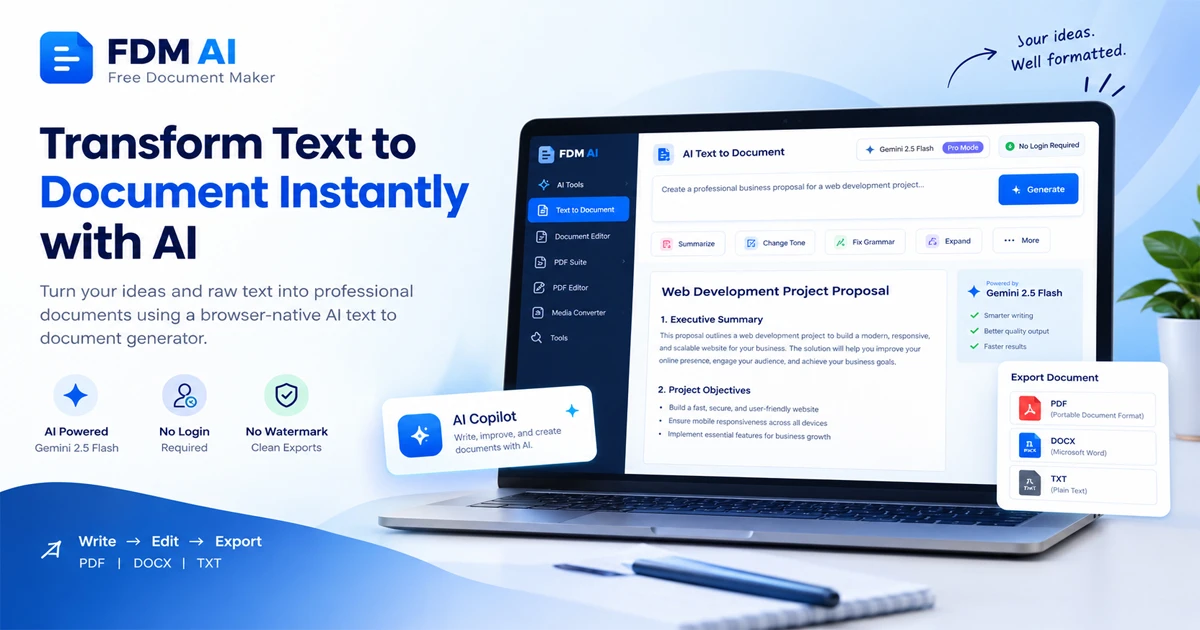
With Free Document Maker (FDM AI), users can explore a browser-native workspace powered by the fdmGTP core and Gemini 2.5 Flash integration. The AI Text to Document Canvas brings AI-assisted writing, editing commands, and document creation together without requiring a traditional desktop application or mandatory account registration.
What Is an AI Text to Document Generator?
An AI text to document generator is an online writing and document creation tool that converts text instructions, rough notes, and existing content into organized documents.
Rather than manually arranging every paragraph, users work with AI-assisted commands to improve structure, refine language, correct grammar, and expand initial ideas. For example, you can provide a simple prompt such as:
"Create a professional business proposal outlining project objectives, estimated costs, deliverables, and a project timeline."
The AI develops the content into a structured draft that you can review and edit before exporting. For broader editing workflows, you can also explore an online document editor or switch to dedicated tools like the AI document writer for long-form drafting.
Why Choose a Browser-Native AI Document Workspace?
Traditional document applications often require heavy software installations, account registration, or recurring subscriptions. A browser-native workflow offers a much more accessible alternative.
The FDM AI Document Canvas is designed around a lightweight, responsive browser interface:
No Registration Required: Start creating documents instantly without completing lengthy registration forms or setting up passwords. Open the workspace and begin working right in your browser.
Secure AI Integration: While your interface and document canvas operate natively inside your browser environment, advanced text generation is securely powered by cloud integration with Gemini 2.5 Flash and the fdmGTP core. This hybrid approach ensures high-speed processing without forcing you to download bulky desktop software.
Cross-Device Accessibility: Access your workspace through any modern web browser across supported desktop and mobile devices without local installations.
Clean, Watermark-Free Exports: Download completed documents without unwanted platform branding, making files immediately suitable for professional use.
Streamlined Workflow: Write, apply editing commands, review generated content, and prepare final exports from a single tab.
Core Features of the FDM AI Document Canvas
The FDM AI Document Canvas combines writing assistance and editing utilities to simplify daily content creation:
AI-Powered Text Generation: Transform short instructions, rough ideas, or bullet points into organized written content for reports, proposals, and letters.
Instant Document Summarization: Turn lengthy text blocks into concise summaries to quickly identify core takeaways.
Professional Tone Adjustment: Refine informal phrasing into polished, professional language suitable for business communication.
Grammar and Writing Improvement: Use automated editing assistance to correct syntax errors and enhance sentence flow.
Content Expansion: Expand brief notes and incomplete thoughts into comprehensive sections.
Quick Editing Commands: Execute common writing tasks instantly without rewriting entire paragraphs manually.
When your workflow extends beyond text generation into file management, you can complement these features with comprehensive PDF tools or utilize a specialized free PDF editor for layout adjustments.
Export Documents in Multiple Practical Formats
Creating content is only part of the equation. Having versatile export formats makes an online document generator truly practical for everyday tasks. The FDM AI workflow supports:
PDF: Ideal for sharing finalized documents while preserving consistent visual layout across all devices.
DOCX: Fully compatible with Microsoft Word and other standard office suites for further offline editing.
TXT: A lightweight plain-text format for transferring raw content or integrating text into other applications.
How to Use the AI Text to Document Generator
Creating a professional document takes just a few straightforward steps:
Open the Workspace: Visit the official AI text to document generator page to launch the browser-based canvas.
Enter Your Instructions: Write a clear prompt describing your document type, or paste existing notes directly into the editor.
Generate & Refine: Leverage integrated AI capabilities to structure drafts, summarize text, correct grammar, or expand individual sections.
Review Your Content: Always verify facts, names, figures, and formatting before using AI-generated documents professionally.
Export Your File: Select your preferred output format (PDF, DOCX, or TXT) and download your clean, watermark-free document.
Browser-Native Canvas vs. Traditional Word Processors
Feature | FDM AI Canvas | Traditional Word Processor |
Browser Access | Yes | Depends on application |
AI-Assisted Writing | Built-in | Requires third-party plugins |
Account Registration | Not required for FDM access | Varies |
Software Installation | Not required | Usually required |
PDF Export | Supported | Supported |
DOCX Export | Supported | Supported |
TXT Export | Supported | Supported |
Frequently Asked Questions
What is an AI text to document generator?It is an online tool that uses AI-assisted writing capabilities to transform prompts, raw notes, and outlines into structured documents.
Can I create documents without registering?Yes. FDM AI provides direct access to its document creation workspace with zero mandatory registration or login barriers.
Which document formats can I export?The platform supports PDF, DOCX, and TXT export options.
Are exported documents watermarked?No. FDM AI provides clean, professional, watermark-free document exports.
Is AI-generated content ready for immediate professional use?AI output provides an excellent starting point, but users should review facts, figures, and formatting before final publishing or sharing.
Conclusion: A Simpler Way to Turn Text into Documents
Creating professional documents no longer requires staring at a blank page or wrestling with complicated formatting tools. By utilizing an advanced AI text to document generator, you can streamline your writing process, leverage intelligent editing commands, and export clean files instantly.
Try the Free AI Text to Document Canvas today at FDM AI Text To Docs and experience a faster, smarter way to manage your digital workflow!
Would you like me to draft another guide for a related tool, such as the PDF suite or the AI document writer?