Every day, millions of professionals, students, and business owners generate massive amounts of unformatted content. Whether you are drafting a contract in Notepad, compiling research notes from a web session, or writing raw code snippets, sending unformatted copy directly to clients looks unpolished.
When you need a fast and reliable way to convert raw text to pdf, relying on complex or expensive desktop software can slow down your workflow. Transforming plain, unformatted copy into a structured, printable, and secure file takes only a few seconds when using the right browser-native tools.
In this comprehensive guide, we will explore why unformatted text needs structure, the step-by-step process to convert raw text to pdf, and how modern document editors keep your data private.
Why You Should Convert Raw Text to PDF
Plain text files (.txt, .log, or raw clipboard copy) lack visual hierarchy. Without defined margins, consistent typography, and clear headers, readers struggle to scan through the material efficiently.
Choosing to convert raw text to pdf provides several distinct advantages:
Universal Compatibility: PDF documents render identically on smartphones, tablets, and desktop computers without layout shifts.
Document Integrity: Unlike plain text files, PDFs lock your formatting, preventing accidental line breaks or altered spacing.
Brand Aesthetics: Clean margins, crisp typography, and visual headers project professionalism to clients and stakeholders.
Enhanced Security: When you convert raw text to pdf, you can easily apply password protection and digital signatures to sensitive files.
Step-by-Step: How to Convert Raw Text to PDF Online
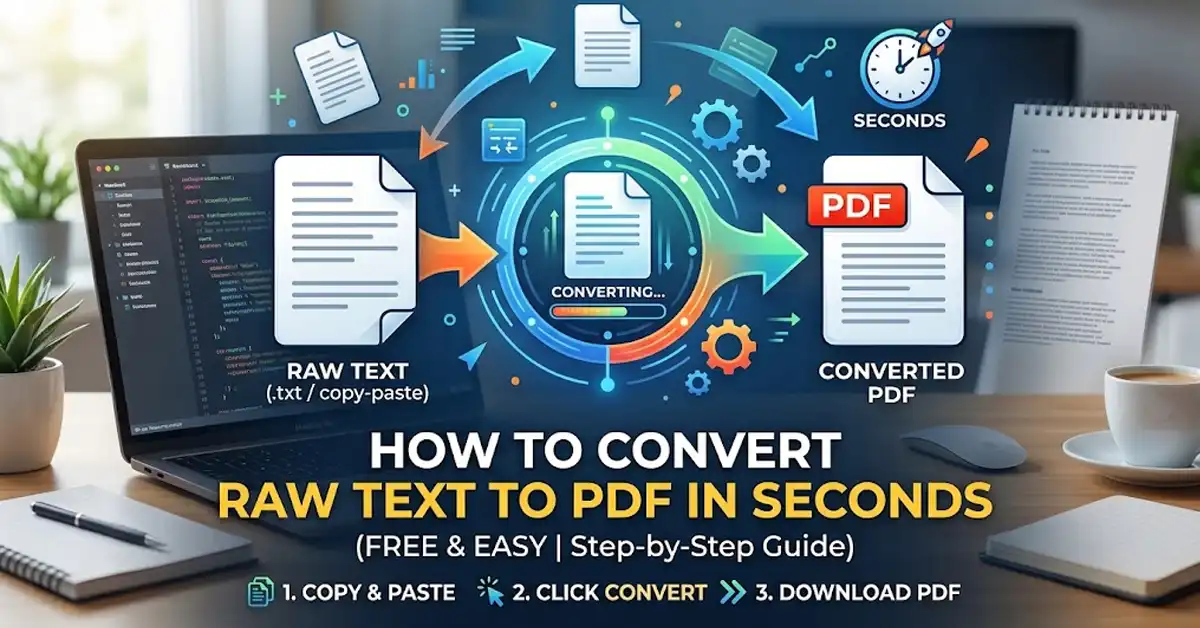
You do not need expensive word processors or bloated desktop applications to style raw text into a clean document. Modern web-based solutions let you convert raw text to pdf using three simple steps.
Step 1: Prepare and Paste Your Text
Start by gathering your unformatted text. This could be meeting minutes, a draft article, an invoice breakdown, or plain notes from your clipboard.
Open your web browser and navigate to a free online document editor like Free Document Maker.
Locate the input canvas or text editor field.
Paste your unformatted content directly into the editor interface.
Step 2: Apply Instant Formatting
Raw text becomes far easier to read when you apply basic visual hierarchy before exporting:
Headings (H1, H2, H3): Highlight key sections to guide the reader’s eye.
Bulleted Lists: Break down dense lists or action items into scannable points.
Font Controls: Choose clean, modern typography (such as Inter or Roboto) to ensure high readability.
Margins & Spacing: Adjust line heights to eliminate visual clutter.
Step 3: Export Your PDF File
Once your text looks organized, you are ready to convert raw text to pdf:
Click the Export to PDF button.
The browser-native engine compiles the text layer into a high-DPI vector PDF.
Download the file directly to your local storage without waiting for email links or cloud rendering delays.
Features to Look for in a Text-to-PDF Converter
Not all document converters offer equal performance or privacy guarantees when you want to convert raw text to pdf. Look for web platforms built around efficiency and security.
Feature | Low-Quality Converters | High-Performance Browser Editors |
Registration Requirements | Mandatory account/email signup | 100% Free, no signup required |
Data Privacy | Files stored indefinitely on servers | Instant local processing or automatic purging |
Watermarks | Aggressive brand watermarks forced on output | Clean, watermark-free document generation |
Processing Speed | Server-side delays and queues | Near-instant browser-native execution |
Common Use Cases for Text-to-PDF Conversion
The ability to convert raw text to pdf solves practical daily challenges across various industries:
1. Legal and Business Drafts
Lawyers, freelancers, and agency owners frequently draft terms, scopes of work, or contract agreements in simple text files. Choosing to convert raw text to pdf ensures that terms remain uneditable during initial client reviews.
2. Academic and Research Notes
Students gathering web citations or raw lecture notes can paste unformatted text into a document editor, add clear headings, and convert raw text to pdf to create clean study guides or term paper drafts ready for printing.
3. Developer Documentation and Logs
Software engineers often need to share system logs, terminal outputs, or code documentation with non-technical stakeholders. Reformatting log files to convert raw text to pdf makes error tracking and technical sharing significantly clearer.
Client-Side Security & Privacy
When handling sensitive business notes, personal identity records, or financial drafts, uploading plain text to unknown third-party servers poses serious privacy risks.
Modern document tools leverage client-side web technologies to convert raw text to pdf directly within your web browser. This architecture means:
Your raw text never leaves your device's memory.
No temporary copies are created on cloud storage buckets.
Data security compliance is maintained automatically because external server transmission is entirely bypassed.
Frequently Asked Questions (FAQ)
Can I convert raw code snippets into a readable PDF?
Yes. When pasting code or technical text into a document editor, select a monospaced font family (like Courier or Monospace) to preserve indentations and syntax alignment before you convert raw text to pdf.
Is there a limit on how much text I can convert at once?
Most high-performance browser editors handle multi-page documents effortlessly. Because processing runs locally on your device, you can convert raw text to pdf across thousands of lines of text in seconds.
Will my generated PDF contain watermarks?
Using privacy-first, free tools like Free Document Maker, your output PDFs remain completely clean and free of watermarks or forced branding.
Start Converting Your Plain Text Today
Stop sharing unformatted, hard-to-read text files. By leveraging lightweight, browser-native conversion tools, you can convert raw text to pdf in seconds—completely free, secure, and without installing complex software.