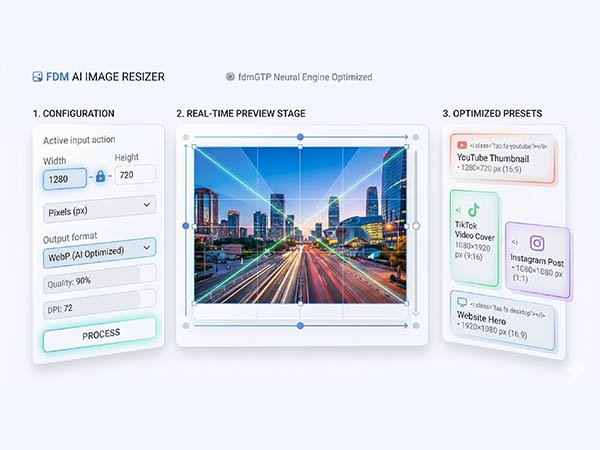
What is Free Document Maker’s Image Resizer?
It’s a free online tool that lets you resize, compress, and convert images directly in your browser. Adjust width, height, DPI, and quality — no software or app required.
Free Document Maker – Image Resizer
Free Image Resizer – instantly change the size, format, and quality of your images (JPG, PNG, GIF, BMP, TIFF, AVIF). No signup. No watermark. 100% browser-based.
Discover our full suite of free, browser-based image tools — no signup, no watermark, no hassle.
Reduce file size while preserving quality. Great for web uploads and faster sharing.
Quickly convert image formats without installing anything. 100% online.
Easily convert WebP images to traditional formats like JPG, PNG, and GIF.
Turn your images into downloadable PDF files — perfect for sharing or printing.
Convert JPG, PNG, and other formats to WebP for better compression and web performance.
Extract images from any PDF or convert PDF pages to JPG, PNG, and more.
Free • Instant • Browser-Based
The Image Resizer is a tool by Free Document Maker that lets you resize images online quickly and privately—no signup or watermarks. Control dimensions, formats, quality, and resolution directly in your browser.
Resize, convert, and download images instantly — free forever.
Free Document Maker’s Image Resizer is an online tool to resize images quickly and securely. Upload JPG, PNG, WebP, AVIF, or GIF, set custom dimensions, and download without signup or watermarks.
Resize Images • Free & Instant
Resize and optimize any image in just three simple steps — no login, no watermark, no limits.
Select a JPG, PNG, WebP, AVIF, or GIF file from your device. Drag & drop or click to browse.
Set custom width and height in pixels or percent. Adjust format, DPI, quality, and more.
Click convert to generate and instantly download your optimized, watermark-free image.
Find clear answers about Free Document Maker’s Image Resizer — how to resize, reduce, and optimize your images online for free in 2025.
It’s a free online tool that lets you resize, compress, and convert images directly in your browser. Adjust width, height, DPI, and quality — no software or app required.
Yes — it’s 100% free. Resize unlimited images with no login, no watermark, and no hidden fees.
Upload your image and adjust the dimensions or quality slider until the preview shows your desired size — for example, 100KB or 300×300 pixels.
Yes. Use the quality slider (80–100%) with smart resizing. It maintains sharpness while minimizing file size efficiently.
You can upload and download in JPG, PNG, WebP, AVIF, and GIF formats. It’s ideal for logos, social media images, and web optimization.
Absolutely. It’s mobile-friendly and works on Android, iPhone, iPad, and desktop browsers — no app or installation needed.
Discover powerful tools, insightful blogs, and our story — everything you need to create, convert, and optimize documents online.
Access 30+ AI-powered tools to create, edit, and convert documents, PDFs, and images instantly.
Read tips, guides, and insights on document management, productivity, SEO, and digital tools.
Learn more about Free Document Maker, our mission, and how we empower people worldwide with free tools.