When you need to Merge PDF Files Online, security, speed, and file size caps should never stand in your way. Most traditional online PDF tools force a difficult compromise: either sacrifice the privacy of your sensitive documents by uploading them to a third-party server, or deal with restrictive paywalls and artificial file limits.
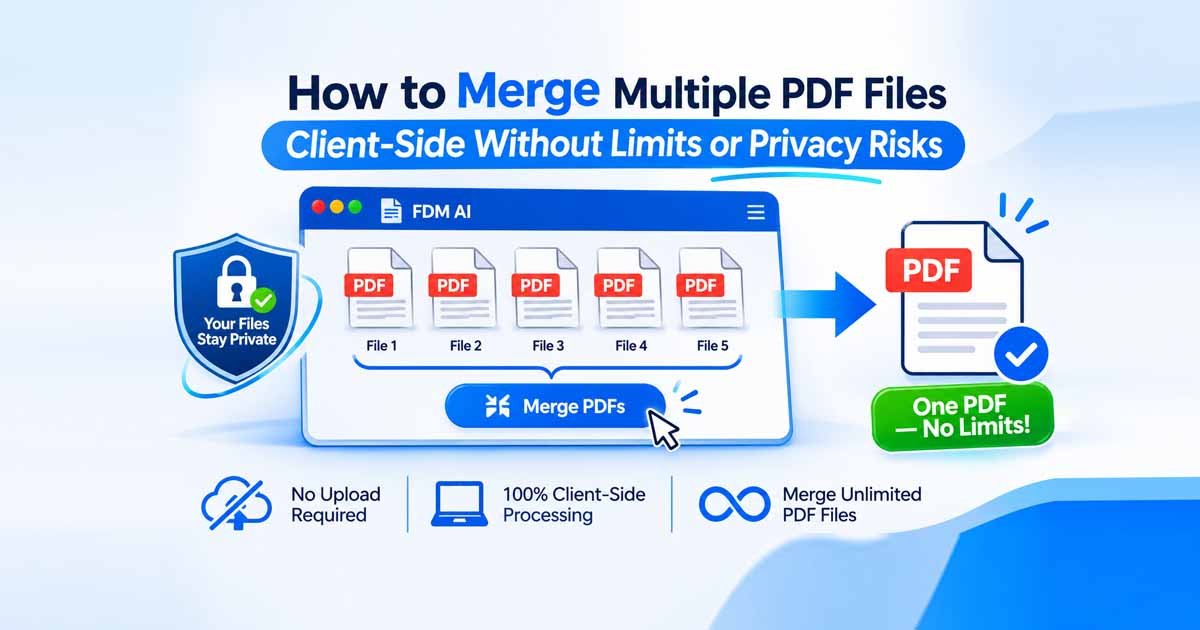
The FDM AI PDF Merger eliminates these trade-offs. By utilizing a 100% Secure Client Sandbox, we allow you to combine multiple PDF layers into a single document frame directly within your browser. Your files never touch an external server, ensuring total privacy while offering instant processing.
Why You Should Merge PDF Files Online Using Client-Side Tools
Privacy is the primary concern for professionals handling legal contracts, financial records, or medical forms. When you use standard cloud-based services to Merge PDF Files Online, your data is transmitted to a remote server for processing. Even if a site claims to delete files immediately, your sensitive data has still left the security perimeter of your device during the upload and processing phase.
FDM AI redefines the standard by moving the entire operation to your local machine. Utilizing modern WebAssembly and local browser storage, the merging process happens in real-time on your computer. This means you can Merge PDF Files Online without the anxiety of data breaches, unauthorized server access, or man-in-the-middle attacks during transfer.
Furthermore, client-side processing ensures there are zero compression losses. Because the files are not being re-rendered on a remote server, the original quality of your vector graphics, fonts, and images remains intact.
How to Merge PDF Files Online Without Limits
Another major frustration with free cloud tools is artificial limitations. You might be restricted to merging only three files at a time, or capped at a total file size of 50MB. These limits exist because server processing power, storage bandwidth, and memory are costly for the provider to maintain for free users.
Because the FDM AI tool processes data within your browser, these restrictions vanish. You depend on your own device's RAM and CPU power, not the provider's server capacity. Consequently, you can Merge PDF Files Online in larger batches, combining dozens of documents or hundreds of pages into one comprehensive file without hitting arbitrary server caps.
Key Advantages of the FDM AI Client Sandbox:
100% Privacy: Files never leave your local device.
Instant Processing: No upload or download waiting times.
No File Limits: Merge as many documents as your browser memory allows.
Zero Quality Loss: Original document fidelity is preserved.
Platform Independent: Works in any modern browser on desktop or mobile.
Quick Guide: How to Merge PDF Files Online
You don't need to install complex software or register for an account to secure your document workflow. Follow these simple steps to combine your PDFs instantly:
Navigate to the Tool: Go to the FDM AI PDF Merger page.
Upload Your Files: Drag and drop your PDF documents into the designated area. You can select them in any order.
Arrange Your Documents: Once uploaded, you can easily drag and drop the file thumbnails to reorder them until they are in the correct sequence for your final merged file.
Merge Instantly: Click the "Merge PDF" button. The processing happens locally in milliseconds.
Download: Your new, combined PDF file will be ready for immediate download to your device.
Verify That Your Files Remain Private
If you are handling highly confidential data, trust is paramount. You do not need to take our word for it; you can verify the client-side nature of the FDM AI PDF Merger yourself using your browser's developer tools:
Open the PDF Merger page in Google Chrome, Microsoft Edge, or Firefox.
Press
F12(or right-click and select "Inspect") to open the Developer Tools panel.Navigate to the "Network" tab.
Drag and drop your PDF files into the merger tool.
Observe: You will see no data being uploaded to any remote server in the network log. The processing is completely local.
Common Use Cases for Local PDF Merging
Professionals across all industries rely on secure, unlimited PDF combining:
Legal & Compliance: Combining case files, evidence, and contracts into a single, secure volume without exposing privileged information to the cloud.
Finance & Accounting: Merging monthly reports, invoices, receipts, and bank statements into comprehensive financial packages.
Academia & Research: Compiling multi-chapter dissertations, research papers, and syllabi.
Remote Work: Quickly organizing disparate project documents before sending them to clients or stakeholders.
Frequently Asked Questions (FAQ)
Can I merge PDF files online without uploading them to a server?
Yes. With FDM AI PDF Merger, you can merge PDF files online inside a 100% Secure Client Sandbox in your browser so your files stay on your device without server uploads.
Are there file limits when I merge PDF files online with FDM AI?
FDM AI PDF Merger is built to merge PDF files online without artificial server upload limits, with practical capacity depending on your browser and available device memory.
Does merging PDFs cause compression losses?
No. Merging combines your PDF layers into a single document frame locally without applying unwanted compression losses.
Do I need to install desktop software to use this tool?
No. Everything runs directly inside your web browser on the FDM AI PDF Merger page.
Merge PDF Files Online with Complete Privacy
Ready to merge PDF files online quickly, securely, and without unnecessary limits? Visit FDM AI PDF Merger on Free Document Maker and combine your PDFs locally in your browser today.
Conclusion: The Superior Way to Combine Documents
Stop compromising on security and convenience when you need to Merge PDF Files Online. Choose a solution that respects your privacy and removes artificial barriers.
Experience the speed, security, and freedom of local processing. Start merging your PDF files securely with FDM AI today.