Creating documents from images is no longer a manual, time-consuming task. In 2026, the rise of the Document Maker From Image technology has completely transformed how users convert photos, screenshots, and scanned files into structured, professional documents. As we move further into an era of digital-first workflows, the ability to bridge the gap between physical visuals and digital text is essential for productivity.
Whether you are dealing with invoices, handwritten notes, academic certificates, or complex scanned pages, modern AI-powered tools can now convert these images into editable, downloadable, and searchable documents instantly.
If you are ready to streamline your workflow directly, you can access our dedicated tools here:
What Is a Document Maker From Image?
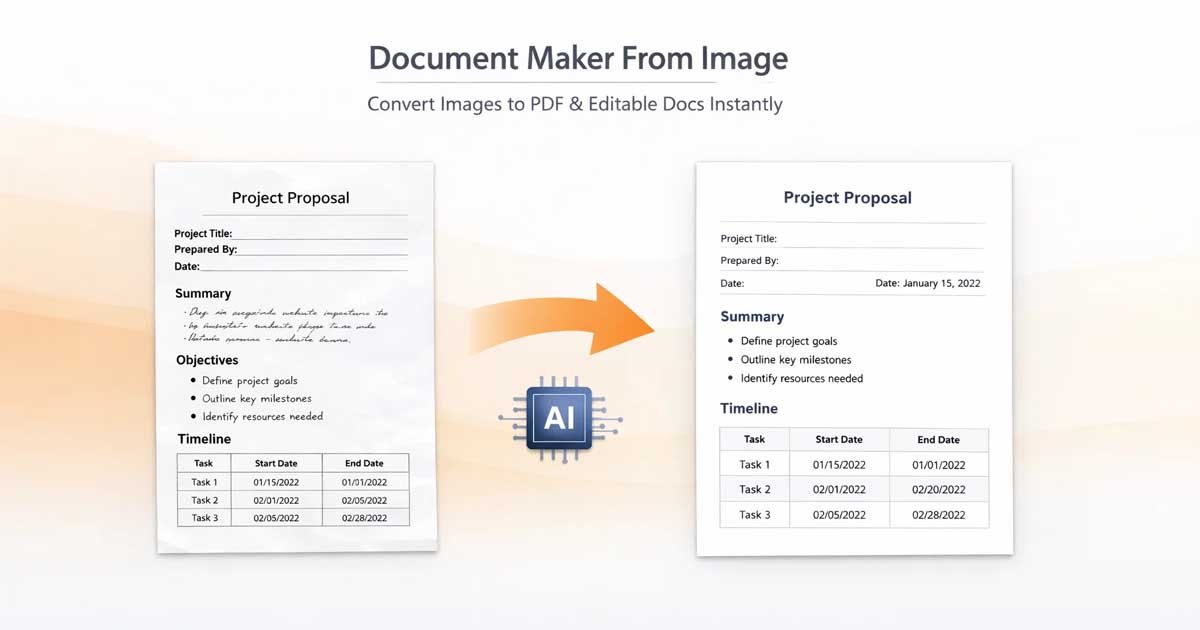
A Document Maker From Image is a sophisticated software utility that converts static image files (such as JPG, PNG, WebP, or HEIC) into structured document formats like PDF, Microsoft Word, or plain text files. While it may look like magic to the end user, this process is governed by a powerful technology known as OCR (Optical Character Recognition), now enhanced significantly by Artificial Intelligence.
OCR technology acts as a bridge between visual data and machine-readable content. It analyzes the shapes of characters within an image and translates them into digital text. In 2026, these systems have evolved significantly, moving beyond simple character recognition to understand document layout, tables, and hierarchical structure.
The basic process flow:
Image Upload → AI Pre-processing → OCR Extraction → Semantic Structuring → Editable Document Generation
This capability allows users to:
Convert scanned, messy documents into clean, professional PDFs.
Extract data from images for spreadsheet or database entry.
Create accessible documents from photos of physical textbooks or letters.
Digitize handwritten notes into typed, searchable text.
Technical Deep Dive: How It Works
To understand why these tools are so effective in 2026, it helps to look at the multi-stage process occurring in the background.
1. Image Pre-processing
Before any text is recognized, the tool cleans the image. It removes visual noise (dust, shadows, or artifacts), corrects rotation (deskewing), and adjusts contrast to ensure the text stands out clearly against the background.
2. OCR Text Extraction
The system uses AI to map every pixel. It identifies letterforms and numbers, matching them against vast libraries of fonts and handwriting styles. This is where "Machine Vision" comes into play, allowing the system to differentiate between an "O" and a "0" or an "I" and an "l" based on context.
3. AI Structuring (Layout Analysis)
This is what differentiates a modern 2026 tool from older software. The AI doesn't just read words; it recognizes the structure. It identifies that a bold line at the top is a Heading, a cluster of data is a Table, and a block of text is a Paragraph. This keeps your document looking like a document, not just a jumbled mess of text.
4. Generation and Download
Finally, the data is packaged into a container. If you requested a PDF, the tool wraps the content in a format that preserves the original layout while making it readable on any device.
Why Document Maker From Image Matters in 2026
1. Unlocking "Dark Data"
Organizations hold mountains of "dark data"—information locked inside images, photos, and scanned papers that cannot be indexed by search engines. By converting these images into documents, you unlock that data, making it discoverable and useful.
2. Unrivaled Time Efficiency
The average human can type about 40 words per minute. An AI document generator can process thousands of words in a few seconds. The time savings for businesses handling receipts, invoices, or archives are massive.
3. Superior Accuracy
Earlier OCR tools struggled with poor lighting or skewed angles. Modern AI models are trained on millions of variations, making them highly resilient to "real-world" conditions, significantly reducing the need for manual proofreading.
4. Environmental Impact (Go Paperless)
Digitizing your environment isn't just about efficiency; it's about sustainability. By turning physical paper archives into clean digital documents, you reduce physical clutter and waste.
5. Browser-Native Accessibility
The shift to web-based, "no-install" tools means you no longer need expensive or bloated desktop software to handle document management. If you have a browser, you have a professional office suite at your fingertips.
Pro-Tips for Better Conversion Results
While AI is incredibly smart, you can get even better results by following these best practices before uploading your image:
Lighting: Ensure the image is evenly lit. Shadows often confuse OCR engines.
Angle: Take photos from directly above. Avoid extreme angles to prevent character distortion.
Resolution: Higher resolution leads to higher accuracy. If possible, avoid highly compressed or pixelated images.
Contrast: If the text is faded, use your phone’s photo editor to boost the contrast before uploading.
Key Features to Look For
A professional-grade tool should offer:
PDF and DOCX Support: Flexibility is key for editing.
Batch Processing: The ability to upload multiple images and convert them into one combined file.
Watermark-Free: Many "free" tools insert intrusive branding. Ensure your output remains clean.
Fast Processing: No one wants to wait; the tool should work in under 5 seconds.
Device Agnostic: Whether you're on a mobile, tablet, or PC, the experience should be consistent.
Popular Use Cases Across Industries
Students & Academia
Students use these tools to digitize library books that cannot be taken home, turn whiteboard photos into readable notes, and organize handwritten research into shareable PDF study guides.
Freelancers & Contractors
Tracking expenses is the bane of freelancing. Contractors use these tools to snap photos of receipts and invoices while on the go, converting them into digital ledgers for tax season.
Business Professionals
Contract management often involves dozens of scanned pages. Legal and HR teams use these generators to turn scanned, locked-image contracts into editable drafts for quick updates.
Content Creators
Creators often use slides, infographics, or physical references. Converting these visual assets into text-based documents allows them to recycle information for blog posts or scripts.
Comparison: Manual Typing vs. Modern AI Tools
Feature | Manual Typing | AI Document Maker |
Time Spent | Hours | Seconds |
Accuracy | Human Error Likely | 99%+ Accuracy |
Cost | High (Labor/Time) | Free |
Accessibility | None | Searchable/Editable |
Limitations & The Reality of AI Conversion
While AI in 2026 is robust, it is helpful to be aware of the limitations:
Extremely Low-Quality Images: If the text is blurred beyond recognition, no software can reconstruct it perfectly.
Highly Artistic Handwriting: While AI recognizes cursive better than ever, "stylized" handwriting with connected loops can occasionally result in character misinterpretation.
Complex Overlays: Images with text placed over complex, busy patterns or watermarks may require manual cleanup.
However, the gap between AI capabilities and manual correction is narrowing daily, making these limitations less relevant over time.
The Future of Document Creation
Where are we heading? By the end of 2026 and beyond, we expect to see "Generative Document Formatting." The tool won't just copy your text; it will understand the intent. If you upload a photo of a rough, handwritten list of expenses, the AI will recognize it as an expense report and automatically generate a professional table in a spreadsheet format, complete with calculated totals.
We are moving from extraction to comprehension.
Conclusion
The Document Maker From Image has evolved from a niche professional tool into a daily essential for students, freelancers, and business professionals alike. By leveraging browser-based AI, you can transform static, inaccessible images into dynamic, professional documents in a matter of seconds.
Stop typing. Start creating. Take control of your workflow by using the right tools to digitize your world.
With tools provided by Free Document Maker, you can turn any image into a structured document instantly — no software, no signup, no delay.
Try it yourself right now:
Frequently Asked Questions (FAQs)
Q: Is my data safe when using a document maker from image?
A: Yes, if you use a reputable, browser-based tool like ours. We prioritize a "Privacy-First" approach, ensuring that data is processed within your session without uploading sensitive files to external servers.
Q: Can it recognize handwriting?
A: Yes! Our AI is capable of recognizing most forms of handwriting, provided the writing is legible and the image is clear.
Q: What file formats are output?
A: Generally, PDF and DOCX are the standard outputs for most professional document makers, ensuring broad compatibility.