In today’s digital-first world, documents are the currency of communication. Whether you are a student submitting an assignment, a freelancer sending an invoice, or a business professional archiving web data, In the modern digital landscape, documents serve as the primary currency of professional communication. Whether you are a student submitting a thesis, a freelancer issuing an invoice, or a corporate professional archiving vital web data, the requirement for a versatile free PDF toolkit has never been more critical.
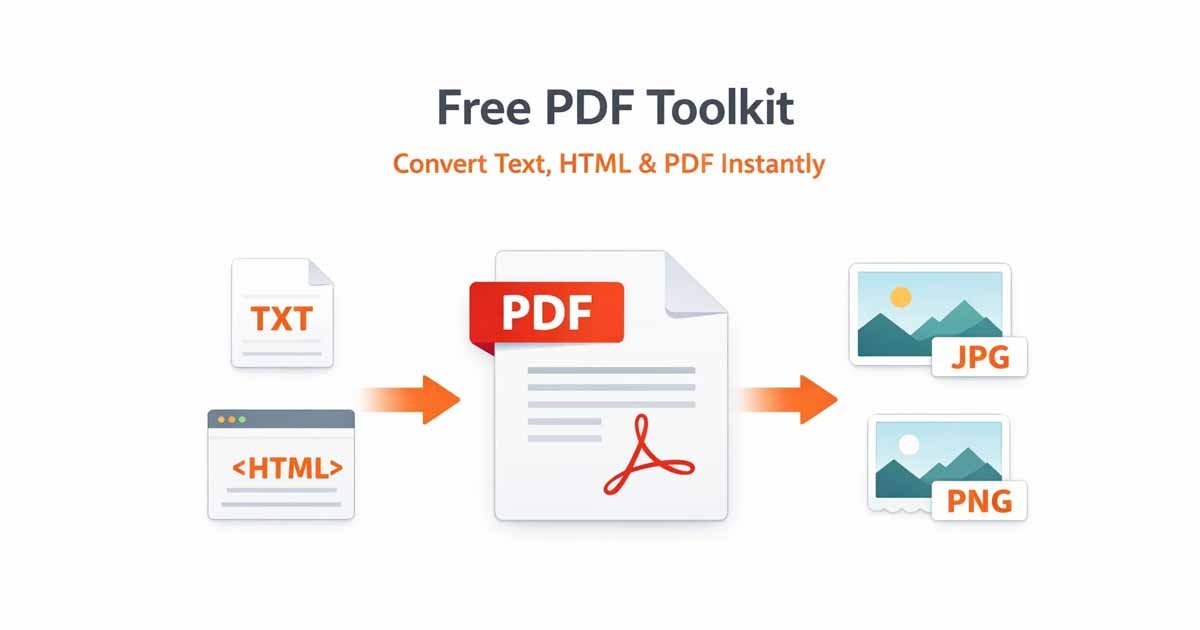
Managing digital documents should not necessitate expensive software licenses or cumbersome local installations. A robust, browser-based free PDF toolkit empowers you to convert text to PDF, transform complex HTML into polished documents, and extract PDF pages as high-resolution images—all from a single interface. This guide explores how to leverage a PDF toolkit to optimize your workflow and why an online document suite is the most efficient choice for your digital workspace.
What is a Free PDF Toolkit?
A free PDF toolkit is a comprehensive suite of web-based utilities designed to create, convert, and modify PDF files without the overhead of desktop applications like Adobe Acrobat. The primary objective is accessibility, providing professional-grade document manipulation tools to any user with an active internet connection.
By utilizing the Free Document Maker (FDM AI), you access a high-performance free PDF toolkit that prioritizes both speed and user privacy. Unlike many "freemium" models that restrict features behind paywalls, a premium-quality PDF toolkit should offer:
Zero Financial Barrier: No hidden subscriptions, tiered pricing, or "pay-to-unlock" features.
Privacy-Centric Processing: Files are processed locally in the browser or purged from servers immediately following conversion.
Clean Output: No intrusive watermarks, ensuring your documents remain professional and brand-aligned.
Universal Compatibility: Seamless operation across Windows, macOS, Linux, Android, and iOS.
1. Convert Text to PDF Online
A core pillar of any reliable PDF toolkit is the capacity to convert text to PDF. While traditional word processors are functional, they are often resource-heavy and slow to load. Frequently, a user simply needs to paste plain text and generate a standardized, uneditable document in seconds.
The Logic of Text to PDF Conversion
The PDF remains the global standard because it preserves visual integrity across all hardware. When you utilize the Text to PDF tool within a PDF toolkit free, you guarantee that your typography, margins, and layout remain identical whether viewed on a mobile device or a high-end office printer.
Common Use Cases for Text to PDF:
Drafting Contracts: Rapidly turning negotiated terms into a formal, non-editable document.
Protecting Creative Work: Saving manuscripts or scripts in a format that prevents accidental text modification.
Professional Reporting: Converting raw notes from a digital scratchpad into a structured PDF for formal email distribution.
2. HTML to PDF: Archiving Web Pages Instantly
Many users encounter frustration when attempting to use a browser's "Print to PDF" function, often resulting in broken layouts, missing graphics, or cut-off text. A specialized PDF toolkit bypasses these issues by employing dedicated cloud-based rendering engines to convert HTML to PDF.
By engaging an HTML to PDF converter, you can capture the exact visual state of a URL. This function is an essential component of a free PDF toolkit for researchers, journalists, and archivists who must preserve web content before it is updated or removed.
Practical Benefits of HTML to PDF:
Transaction Records: Saving digital receipts or booking confirmations from websites that do not provide a native download option.
Research and Education: Converting long-form academic articles into PDFs for offline study and annotation.
Regulatory Compliance: Capturing time-stamped web content for legal records or audit trails.
3. PDF to Image: JPG and PNG Extraction
In certain professional contexts, a PDF is not the ideal format. Social media platforms, content management systems (CMS), and mobile messaging apps typically prioritize image files. A comprehensive PDF toolkit must include the functionality to convert PDF to JPG or PNG.
The PDF to Image tool effectively "photographs" every page of your document, providing high-fidelity image files that are ready for immediate use in visual projects.
When to Utilize PDF to Image Conversion:
Digital Marketing: Posting document-based flyers or event announcements on visual platforms like Instagram or LinkedIn.
Design Workflow: Importing specific pages of a report into graphic design software like Canva or Adobe Photoshop.
Presentation Integration: Embedding high-resolution document snapshots directly into Google Slides or PowerPoint presentations.
Why Choose an Online Free PDF Toolkit Over Desktop Software?
The choice between a web-based free PDF toolkit and traditional desktop software involves weighing convenience against cost. For the vast majority of users, a cloud-based PDF toolkit is the superior solution.
Optimized Deployment
Desktop software occupies valuable disk space and requires frequent manual updates. Conversely, a PDF toolkit is always updated to the latest version and is instantly accessible via any web browser. This allows for a "start anywhere, finish anywhere" workflow.
Economic Advantages
Enterprise-grade PDF suites can cost hundreds of dollars in annual licensing fees. A free PDF toolkit provides approximately 99% of the functionality required by the average user—including conversion, extraction, and formatting—at zero cost.
Secure Document Handling
Data security is a valid concern when handling sensitive information. Modern implementations of a free PDF toolkit, such as Free Document Maker, utilize high-level encryption and do not store user-uploaded data. This transforms the FDM AI PDF toolkit into a safe environment for both personal and professional documentation.
Comparison: Features of the Ultimate Free PDF Toolkit
Feature | Text to PDF | HTML to PDF | PDF to Image |
Input Source | Raw Text / Clipboard | Web URL / HTML Link | Existing PDF Files |
Output Format | Standard .pdf | Standard .pdf | .jpg / .png Images |
Primary Utility | Document Creation | Web Archiving | Visual Content Sharing |
Processing Speed | Near-Instant | 5-10 Seconds | Instant |
How to Use the Free PDF Toolkit: A Step-by-Step Guide
The user interface of a modern PDF toolkit is designed to be frictionless, requiring no specialized technical knowledge to achieve professional results.
Identify the Requirement: Navigate to the (FDM AI) Free Document Maker homepage and select the tool that matches your task.
Upload or Paste Data: Insert your text, provide the target URL, or upload the specific PDF file you wish to modify.
Initiate Conversion: Select the conversion button. The PDF toolkit backend will process the data using high-speed cloud infrastructure.
Download the Result: Save the processed file directly to your local storage. There is no requirement for account registration or email verification.
Final Thoughts on the Free PDF Toolkit
Efficient document management is essential for productivity. A PDF toolkit empowers you to take full control of your digital assets, ensuring they are always formatted correctly for your target audience.
Whether you are using the toolkit to convert text to PDF for a clean professional look or utilizing HTML to PDF for comprehensive web archiving, the utility of these tools is unparalleled. Eliminate the need for expensive, bloated software and switch to a faster, more secure, and entirely FDM AI PDF toolkit today.
Ready to convert? Visit the Free PDF Toolkit now to experience professional, seamless document management at no cost.