Need to create a legally binding agreement online in 2026 but don’t want to hire an expensive lawyer or wrestle with confusing, outdated Word templates?
You’re not alone. Every day, thousands of freelancers, small business owners, landlords, and individuals need a fast, reliable way to create agreements without draining their bank accounts or wasting hours of their time. Historically, drafting a legal document meant paying hefty retainer fees. Today, technology has democratized the process.
That’s where Free Document Maker (FDM AI) comes in. Our platform helps you create a legally binding agreement online for free using a simple, modern, and intuitive generator.
In this comprehensive guide, we will walk you through exactly how to generate a professional contract, what elements make an agreement legally enforceable, and the common mistakes you should avoid.
What Makes an Agreement Legally Binding?
Before you generate a document, it is important to understand what actually makes a contract enforceable in a court of law. You don't need a law degree to draft a valid contract, but your document must contain these five core elements:
Offer and Acceptance: One party must offer something (like a service), and the other party must accept the terms of that offer.
Consideration: Something of value must be exchanged. This is usually money, but it can also be services, goods, or a promise to perform an action.
Mutuality of Obligation: Both parties must have a clear understanding of what they are agreeing to. There must be a "meeting of the minds."
Competency and Capacity: Both parties must be of legal age and mentally capable of understanding the contract they are signing.
A Legal Purpose: You cannot write a legally binding agreement for an illegal act.
As long as your document covers these bases, you can confidently create a legally binding agreement online.
4 Steps to Create a Legally Binding Agreement Online for Free in 2026
To create a legally binding agreement online for free in 2026, you need a structured workflow. This process allows you to generate professional contracts without legal complexity or expensive services.
Step 1: Gather Your Information Clearly
The first step is preparation. Before opening an agreement generator, make sure you have all the necessary details mapped out. You will need:
The full legal names and addresses of all parties involved.
A clear, detailed description of the services, goods, or promises being exchanged (the "Scope of Work").
Payment terms (How much? When is it due? Are there late fees?).
Important dates (Start date, deadlines, and termination date).
Step 2: Use a Free Online Agreement Generator
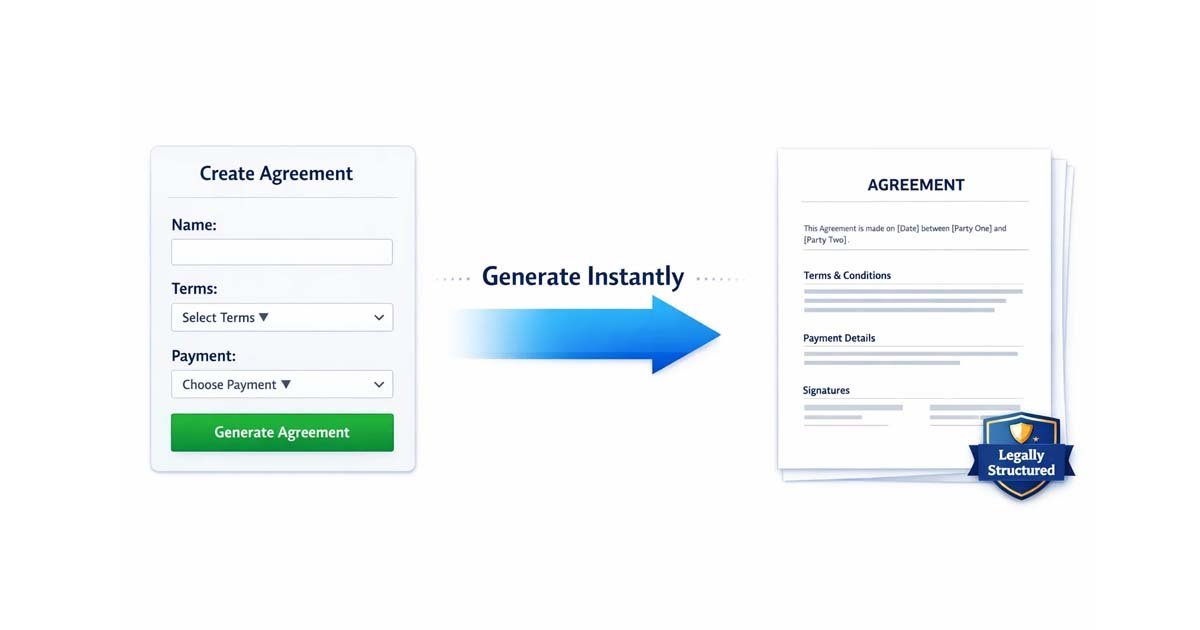
The easiest and fastest way to create a legally binding agreement online is by using a specialized tool like Free Document Maker. Instead of manually editing messy templates where you might accidentally delete an important legal clause, our tool guides you through the process.
Simply input your gathered information into the simple form fields. The generator handles the legal jargon and formatting behind the scenes:
Enter party details
Define scope of work
Add payment terms
Set conditions and clauses
This saves time and reduces errors.
Step 3: Add Necessary Clauses and Conditions
Depending on your project, you might need specific protections. Using our generator, you can easily define:
Confidentiality: Ensure the other party doesn't share your trade secrets.
Dispute Resolution: State how disagreements will be handled (e.g., arbitration or mediation).
Termination Clauses: Outline exactly how and when either party can cancel the agreement.
Step 4: Download and Finalize Your Agreement
Once your agreement is properly filled out, you can instantly download it as a clean, professionally formatted PDF file. The tool provides:
Instant PDF download
Professional, structured formatting
Signature-ready layout for physical or electronic signatures
This ensures your document is ready for real-world use.
Common Types of Agreements You Can Generate
You can use Free Document Maker to generate a wide variety of contracts, including:
Freelance & Independent Contractor Contracts: Protect yourself and guarantee payment when offering services like writing, design, or consulting.
Non-Disclosure Agreements (NDAs): Protect your intellectual property or business ideas before sharing them with a partner or employee.
Service Agreements: Outline the exact scope of services a company will provide to a client.
Business Partnership Agreements: Define ownership percentages and responsibilities when starting a new venture with a partner.
Why You Need a Written Contract (Even for Small Jobs)
Creating a legally binding agreement online does more than just protect you in a courtroom—it actually improves your business relationships.
Prevents Misunderstandings: Memory fades, but a written PDF does not. Contracts clearly define expectations so no one is confused later.
Ensures Timely Payment: Clear payment terms and late fee clauses encourage clients to pay on time.
Provides Legal Proof: Serves as concrete evidence in the event of disputes.
Builds Trust: Presenting a clean, professional contract shows the other party that you are serious, organized, and professional.
Even simple projects benefit greatly from having a written agreement in place.
Mistakes to Avoid When Drafting Your Own Contract
If you are choosing to create a legally binding agreement online without a lawyer, avoid these common pitfalls:
Being Too Vague: Don't just write "design a website." Write "design a 5-page WordPress website including homepage, about us, and contact page by [Date]."
Forgetting Signatures: An agreement isn't binding until it's signed. Ensure both parties sign and date the document. Electronic signatures are federally recognized as valid!
Using the Wrong Names: Always use the official legal name of the business (e.g., LLC or Inc.) rather than just a casual brand name.
Benefits of Using Free Document Maker
Why choose Free Document Maker over traditional downloadable Word templates?
No signup or credit card required: It is truly free.
No annoying watermarks: Your document looks 100% professional.
Fully customizable: Tailor the agreement to your exact needs.
Instant PDF export: Ready to email or print in seconds.
Mobile-friendly: Draft an agreement on your smartphone while on the go.
Frequently Asked Questions (FAQ)
Is it actually legal to create a legally binding agreement online?
Yes. As long as the agreement contains an offer, acceptance, consideration, and mutual consent between competent parties, an online-generated contract is just as legally binding as one typed up by a lawyer.
Do electronic signatures make the agreement legally binding?
Yes. Under the ESIGN Act of 2000, electronic signatures carry the exact same legal weight as traditional pen-and-paper signatures in the United States and most other countries.
Do I need a witness or a notary?
For most standard business contracts, freelance agreements, and NDAs, you do not need a notary. Notaries are typically only required for major life events like real estate deeds, wills, or certain financial powers of attorney.
Final Thoughts on Creating a Legally Binding Agreement Online
In 2026, you don’t need an expensive attorney or complex, confusing software to protect your business and personal interests.
With FreeDocumentMaker.com, you can create, customize, and download agreements in minutes.
It’s fast, free, and built for modern users who want simplicity without sacrificing professional results. Don't leave your next project to chance.
Explore More Free Tools for Document Creation
Maximize your productivity with our other free business tools: