In our hyper-connected digital landscape, QR codes have quietly transformed from a niche inventory tool into the ultimate bridge between physical reality and digital experiences. Whether you need a highly functional free QR code generator to elevate a marketing campaign, a quick way to share your home Wi-Fi network without typing complex passwords, or a secure method to collect customer payments, having the right platform changes the game.
This comprehensive, step-by-step guide covers everything you need to know about QR codes in 2026: how they encode information, the critical structural differences between static and dynamic types, the best tools for the job, quick setup guides for all major operating systems, and vital security frameworks to protect yourself against modern cyber threats.
What is a QR Code?
A QR code (Quick Response code) is a two-dimensional matrix barcode capable of storing data both horizontally and vertically. Invented in 1994 by the Japanese automotive company Denso Wave, it was originally engineered to track vehicles and parts during manufacturing due to its rapid scanning speeds and high component capacity.
Unlike traditional linear barcodes—which can only hold roughly 20 to 30 alphanumeric characters across a single horizontal line—a single código qr can securely store thousands of characters. This expanded real estate allows it to seamlessly hold complex data types, including:
Website URLs and social media profiles
Wi-Fi network credentials (SSID, password, and encryption type)
Comprehensive contact cards (vCards) containing emails, phone numbers, and addresses
Direct bank transfers, peer-to-peer mobile payments, and crypto wallet addresses
Plain text notifications, event coordinates, and PDF documents
Because of their unique square configuration and distinct alignment anchor points, they can be processed instantly from virtually any angle using a standard smartphone lens, tablet camera, or dedicated hardware QR reader.
Static vs. Dynamic QR Codes: The Critical Choice
Before navigating to an online platform to generate a QR code, it is vital to understand the two core mechanics behind the data architecture. Selecting the wrong type could ruin an entire physical print run of business cards, restaurant menus, or multi-page brochures if your digital pathways change later down the road.
Static QR Codes
With a static layout, your final destination data is hardcoded directly into the geometric pixel matrix itself. The more complex the data you enter (such as a lengthy URL filled with tracking metrics), the denser, more tightly packed, and complex the pixel grid becomes.
The Advantage: They are completely free to make, never expire, and function perfectly without relying on intermediary web servers.
The Disadvantage: They are permanent. If your website URL alters, if your business rebrands, or if you make a tiny typo before you hit print, the code becomes completely useless.
Dynamic QR Codes
A dynamic layout encodes a short, static redirection link rather than your ultimate destination file. When a user points their QR scanner at the graphic, they are routed through a cloud-based redirection server which forwards them to the target destination within milliseconds.
The Advantage: You can change your destination link at any point in time without changing the physical printed code pattern. Additionally, because the code only holds a short redirection URL, the pixel grid stays low-density and highly scannable. Dynamic codes also unlock rich data analytics, detailing real-time tracking metrics like scan counts, location data, timestamps, and device operating systems.
The Disadvantage: Because they require an active hosting platform to maintain the redirect link, advanced customization features and long-term usage are typically tied to premium subscription plans.
Best Free QR Code Generator & Scanner Tools (2026)
Finding a reliable QR code generator free of hidden subscription traps, intrusive advertisements, or forced branding watermarks can feel exhausting. Fortunately, a few standout platforms lead the industry in flexibility, transparency, and high-definition asset exports:
Tool Platform | Core Strength | Key Technical Asset | Pricing Model |
FDM AI QR Code Generator | Modern, Elegant Design AI Integration | Clean interface with advanced, high-resolution aesthetic generation options | Free options available via the FDM QR Generator Link |
QR Code Monkey | Extensive Brand Customization | Exceptional multi-format vector exports (SVG, PDF, EPS) with granular design controls | 100% Free for all standard static creation paths |
FDM AI Online QR Scanner | Zero-Install Cross-Platform Tool | Instant in-browser decryption from static images or live webcams | Accessible directly at the FDM QR Scanner Link |
How to Create a QR Code in 5 Simple Steps
Ready to create a QR code? The entire generation cycle takes less than two minutes when following this straightforward step-by-step workflow:
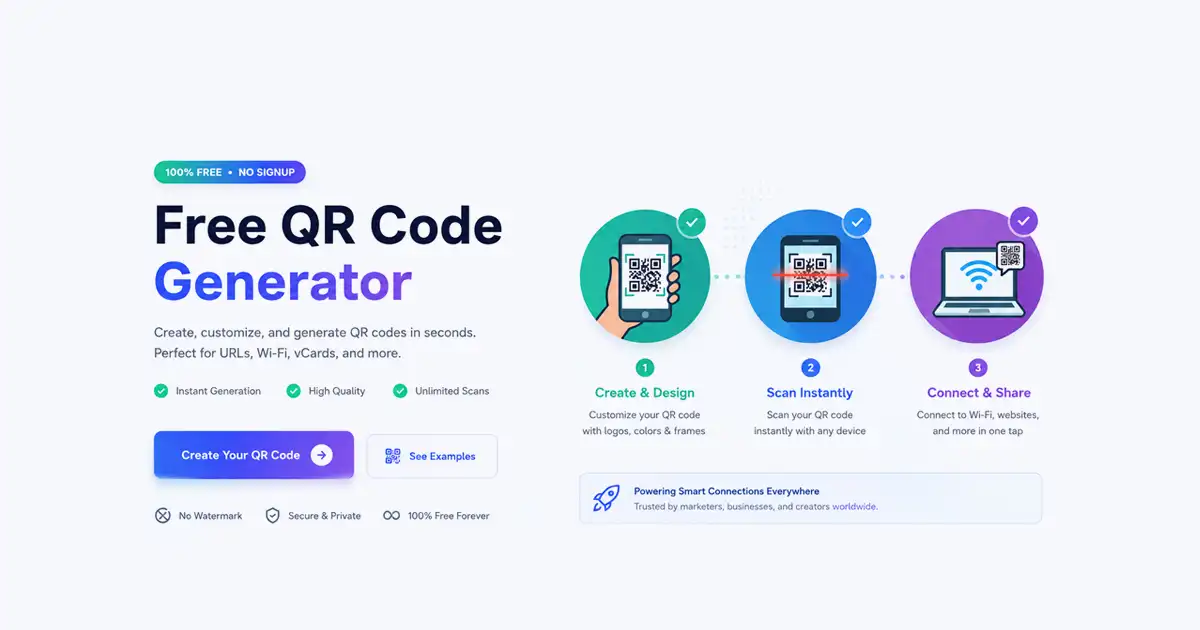
Select Your Destination Data Type: Navigate to your preferred platform, such as the FDM AI QR Code Generator. Choose your data payload from the menu layout (URL website string, Wi-Fi configuration credentials, vCard contact, or direct plain text block).
Input Data and Target Paths: Carefully paste your web address or enter your technical parameters. Triple-check every single character for typos if you are generating a permanent static file.
Inject Custom Branding Aesthetics: Tailor the visual composition to blend cleanly with your existing identity assets. Adjust the contrast foreground and background hex colors, smooth out sharp corners into custom rounded eye structures, and upload your central brand logo.
Calibrate the Technical Error Correction Levels: If you added a prominent center logo or intend to deploy your asset in high-wear physical environments, elevate your Error Correction Code (ECC) settings. Higher error correction adds redundant pixel data blocks, allowing the code to stay fully functional even if up to 30% of its surface area gets scratched, dirty, or torn.
Process and Export Your High-Definition Asset: Click Generate QR Code. Preview the output directly on-screen using your personal phone camera to confirm it works perfectly. Download the final file in high-resolution PNG format for basic screen apps, or SVG/PDF formats for large-scale physical print manufacturing.
QR Code Scanner: How to Scan Effortlessly on Any Device
Processing an inbound code is incredibly streamlined across modern hardware systems, though configuration choices vary by ecosystem.
1. Modern Mobile Environments (iOS & Android)
Most modern smartphones feature a native QR scanner built seamlessly into the default camera application. Simply unlock your phone, launch the camera app, point the frame steadily at the design matrix for a split-second, and tap the interactive action sheet banner that drops down into your viewport.
2. Desktop and Cloud-Based Browser Options
If you are working on a laptop, using a desktop computer without a camera tracking setup, or reviewing a saved graphic file sent to you via email, you do not need to struggle to find a workaround. You can instantly utilize a dedicated web tool like the qr code scanner online module on the FDM AI Online QR Scanner. This utility lets you quickly upload saved image files, drag and drop active screenshots, or utilize your computer's built-in webcam to securely decode metadata right inside your browser session without installing software.
How to Connect to Wi-Fi Using a QR Code
One of the most satisfying daily use cases for this technology is setting up automated network provisioning portals. Rather than spelling out long, complex security keys to guests at home or visitors inside a business lounge, you can deploy a network code for instant boarding access.
On Apple iOS and Google Android Devices
Open your stock camera app, focus on the Wi-Fi card pattern, and watch for the network access prompt to materialize. Click the message layer, and your phone will automatically communicate with the router, authenticate configuration variables, and join the secure network without requiring manual text entry.
On Windows 10 & 11 Ecosystems
If your personal laptop or desktop hardware configuration includes a functioning webcam, you can connect to wi-fi using qr code windows tools natively through these steps:
Hit the Windows key, search for Camera, and open the built-in system application.
Scan the peripheral control layouts to locate the specialized Barcode/QR Code scanning mode icon to prime the camera sensor.
Hold your printed Wi-Fi code up to the lens viewport.
Windows will instantly read the specialized WPA/WPA2 configuration strings, handle network handshakes behind the scenes, and automatically log your workstation into the active local area network.
Advanced QR Code Use Cases
The universal accessibility of these data nodes drives highly diverse integrations across countless international business channels:
Interactive Hospitality Menus: Restaurants eliminate printed paper overhead costs and update menu pricing dynamically by using point-of-sale linked codes.
Contactless Ticketing Infrastructure: Transit hubs, entertainment arenas, and mass-market conference organizers run scanning portals at check-in terminals to track thousands of entries per minute.
Product Authentication Systems: High-end manufacturing pipelines embed secure matrix stamps directly onto packaging labels, enabling customers to scan assets to verify genuine origin records.
Contextual Out-of-Home Marketing: High-visibility public transit hubs, real estate flyers, and event posters transform passive viewers into active online traffic funnels with scannable calls to action.
Whether localized as a simple código qr or searched globally under terms like qr code generator kostenlos, the technology serves as a universal language for cross-platform data synchronization.
Cyber Security Risks: How to Stay Safe While Scanning
Because human beings cannot read the raw underlying data patterns within an encoded pixel matrix, bad actors occasionally target the technology for malicious exploitation. These tactical vectors are frequently referred to by security groups as "Quishing" (QR Code Phishing).
To enjoy the sheer convenience of the technology without exposing your digital life to vulnerabilities, memorize these core defensive security practices:
⚠️ Critical Safety Framework:
Verify the Physical Substrate: Scam artists occasionally paste fraudulent, custom-printed adhesive stickers over legitimate QR codes located on high-traffic public infrastructure—such as parking meters, public electric vehicle charging stations, or outdoor informational displays. Always feel the material surface; if you notice a thick, misaligned sticker layered over an official sign frame, skip the scan.
Analyze the URL String Previews: When scanning a code in public spaces, carefully study the landing page path preview before tapping through to clear the action banner. Ensure the domain name uses secure HTTPS protocols, matches the official organization name, and is completely free of suspicious subdomains or typos.
Guard Sensitive Credentials: An authentic public QR code will almost never take you directly to a blind landing page that demands immediate input of bank details, social profiles, or primary email passwords. If a quick scan drops you directly onto an aggressive, high-pressure payment screen or an unexpected secure credential login box, close the tab immediately.
Frequently Asked Questions (FAQs)
1. Are QR codes generated by a free QR code generator permanent?
Yes, if you create a Static QR code. When you use a free QR code generator to create a static code, the data is hardcoded directly into the square design pattern. These codes never expire, have no scan limits, and will work permanently as long as the underlying link or information remains active and unchanged.
2. Can I edit the link of my code after downloading it from a free QR code generator?
Only if you generated a Dynamic QR code. If you created a Static QR code, it cannot be edited because the information is permanently embedded in the pixel pattern. If your link changes, you will have to generate a brand-new code. To edit the destination link later without changing the printed graphic, you must select the Dynamic option when creating your code.
3. Do free QR code generators put hidden watermarks or logos on the codes?
Top-tier platforms like FDM AI QR Code Generator and QR Code Monkey do not force any unwanted watermarks or branding onto your static codes. However, you should be careful with random online tools, as some may add hidden scan limits or display annoying redirection ads unless you upgrade to a paid tier. Always test your generated code with a smartphone camera before printing.
4. How do I choose the right file format when exporting from a free QR code generator?
The format you choose depends entirely on where you plan to use the code:
PNG / JPEG: Best for digital displays, website pages, social media posts, and small print items like personal business cards.
SVG / PDF / EPS: These are vector formats. They are highly recommended for professional high-resolution printing, packaging, and large banners because they can be scaled to any size without losing crispness or scannability.
5. Why isn't my code reading properly when I use a QR code scanner?
If a smartphone lens or a qr code scanner online tool cannot read your code, it is usually due to one of three common issues:
Low Contrast: The foreground color of your QR code is too close to the background color. Always ensure dark pixels sit on a crisp, light background.
Overcrowded Data: You packed too much text or a massive URL into a static layout, making the pixels too dense for cameras to read.
Low Resolution: The code was printed in low quality or scaled up clumsily from a small PNG file, causing the edges to blur.
Final Thoughts & Next Steps
Whether you are configuring an advanced web layout to generate a QR code for your business venture or using a simple QR reader to access an item description, utilizing high-quality, reliable web engines makes your daily digital life incredibly fluid. FDM AI best Free Qr Code Tools.
Ready to get started? Navigate to the comprehensive FDM AI QR Code Generator to design your custom static assets, or bookmark the secure FDM AI Online QR Scanner web tool to ensure you can decode any matrix file seamlessly and safely from any workstation!