Understanding the Two Platforms. Document automation tools have evolved rapidly in recent years. Both organizations and individuals now rely on artificial intelligence to process invoices, analyze forms, generate documents, and convert files automatically.
Two platforms that represent very different approaches to document workflows are Google Document AI and Free Document Maker (FDM AI).
Google Document AI focuses on large-scale enterprise automation and machine learning–driven document analysis. Free Document Maker, on the other hand, provides a browser-based workspace for creating, editing, and converting documents instantly.
Understanding the differences between these tools can help determine which platform is best suited for different types of users and workflows.
What Google Document AI Does
Google Document AI is part of the Google Cloud ecosystem and is designed to extract structured data from documents automatically.
The platform relies on technologies such as:
Optical Character Recognition (OCR)
Natural Language Processing (NLP)
Machine learning models
Document classification systems
These technologies allow the system to analyze large document collections and extract important information such as:
invoice totals
dates and transaction records
vendor names
form fields
signatures and structured data
Because of these capabilities, Google Document AI is widely used in industries such as:
banking and financial services
insurance processing
healthcare record management
logistics and supply chain operations
Organizations often integrate the platform into automated workflows where thousands or even millions of documents must be processed efficiently.
Limitations for Everyday Users
While Google Document AI is extremely powerful, it is primarily designed for developers and enterprise environments.
Using the system typically requires:
a Google Cloud account
billing configuration
API integration
JSON data handling
programming knowledge
For someone who simply needs to create a resume, convert a file, sign a PDF, or generate a certificate, this level of technical setup can be unnecessarily complex.
Google Document AI also focuses mainly on data extraction, not on document creation or editing tools.
As a result, many everyday users look for simpler tools that work instantly without technical configuration.
What FDM AI Provides
Free Document Maker (FDM AI) is a browser-based platform designed for practical document tasks used by everyday users.
Instead of requiring cloud APIs or software installations, the platform provides instant access to a collection of more than 30 productivity tools directly in the browser.
Examples of available tools include:
AI resume generator
invoice creator
certificate generator
PDF editor and converter
image and WebP converters
file compression utilities
AI writing and document tools
These tools are designed for quick use without account creation or subscription requirements.
Users can open the website, generate a document, and download the result within seconds.
Designed for Everyday Workflows
Free Document Maker is aimed at people who frequently create or modify documents but do not require complex automation systems.
Typical users include:
students preparing assignments or resumes
freelancers creating invoices and contracts
teachers issuing certificates
small businesses generating quotes or reports
designers and developers converting images or PDFs
The platform focuses on speed, simplicity, and accessibility, allowing documents to be created or converted instantly.
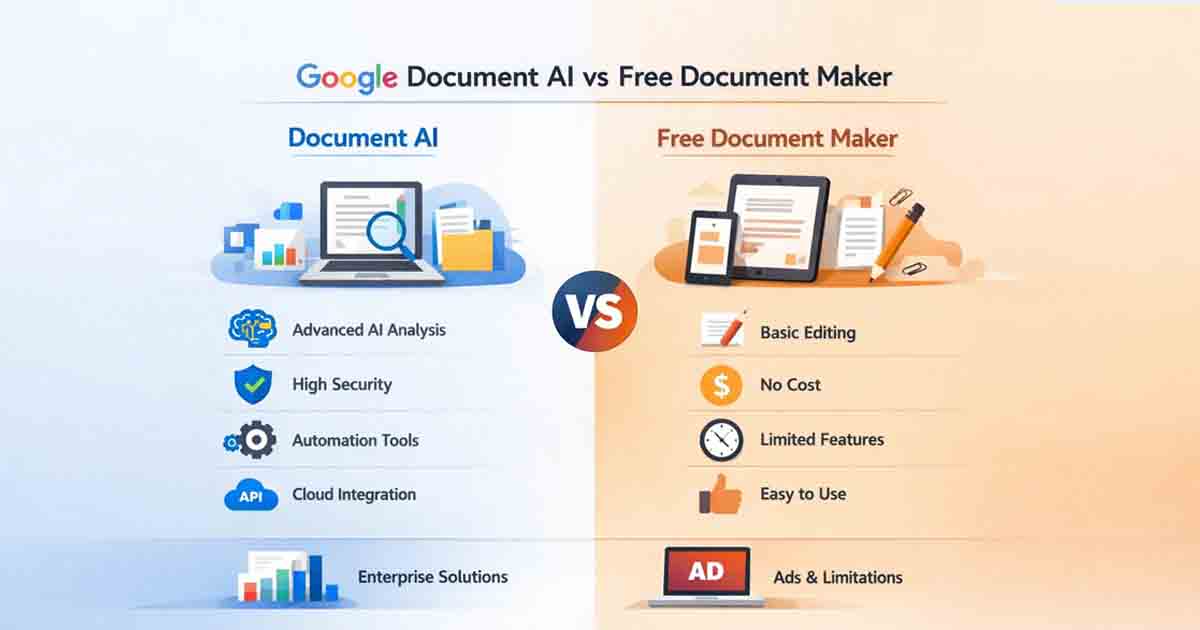
Google Document AI vs Free Document Maker (FDM AI)
The two platforms serve very different purposes.
| Feature | Google Document AI | Free Document Maker |
|---|---|---|
| Primary Purpose | Enterprise document automation | Everyday document creation and editing |
| Typical Users | Developers and enterprises | Students, freelancers, small businesses |
| Setup | Requires Google Cloud API configuration | Works instantly in the browser |
| Tools Available | Data extraction and document analysis | 30+ document, PDF, image, and writing tools |
| Cost Structure | Usage-based cloud pricing | Free tools with no login required |
| Best Use Case | Processing large document datasets | Quick document creation and file conversion |
Why Simplicity Matters for Many Users
Large organizations often require complex document processing systems like Google Document AI. These systems can analyze massive volumes of forms, invoices, or records automatically.
However, the majority of individuals do not need large-scale automation. Most people simply need tools to:
create documents quickly
edit or convert files
generate PDFs
optimize images
write or format content
For these everyday tasks, simpler browser-based tools often provide a more practical solution.
A Note on the Free Document Maker AI Ecosystem
In addition to document tools, FDM AI also includes a range of productivity utilities designed to simplify digital workflows.
These tools support tasks such as:
document generation
PDF editing and conversion
image optimization
file compression
AI writing assistance
Because all tools operate directly in the browser, users can complete tasks quickly without installing software or creating accounts.
Final Thoughts
Google Document AI remains one of the most powerful enterprise platforms for automated document processing and data extraction. It is particularly valuable for organizations managing large document workflows.
However, for everyday users who simply need to create, edit, convert, or download documents quickly, the complexity of enterprise systems may not be necessary.
Platforms like Free Document Maker (FDM AI) provide a more accessible alternative by offering fast, browser-based tools that handle common document tasks instantly.
Both tools serve important roles — one for enterprise automation and the other for practical everyday productivity.