In today’s digital-first world, carrying physical documents for wet signatures is becoming increasingly outdated. Whether you’re a freelancer sending invoices, a business owner closing deals, or a professional handling contracts, a clean Transparent PNG E-Signature can save you hours every week.
Modern business operations require speed and efficiency. The old method of "print-sign-scan" is not only a waste of paper but also a bottleneck in your workflow. Our free online signature generator lets you create a natural, handwritten-style digital signature with a fully transparent background in under 30 seconds — no account, no payment, and no data leaving your device.
Why Transparent PNG is the Best Choice for E-Signatures
Most signature tools generate images with a solid white background. While this might work on plain white documents, it looks unprofessional and amateurish on colored PDFs, branded invoices, or complex templates.
A Transparent PNG E-Signature solves this problem completely. Because the PNG format supports alpha-channel transparency, your signature blends seamlessly with any background—just like a real pen-and-paper signature on a physical document. This versatility makes it ideal for:
Professional contracts: Ensuring the signature sits perfectly on the line.
Layered PDF documents: Maintaining clarity over text and watermarks.
Branded invoices: Keeping your brand identity clean and crisp.
Certificates and agreements: Adding a touch of authenticity to digital awards.
Key Features of Our Free Online Signature Generator
When building this tool, we prioritized user experience and security. Here is what makes our Transparent PNG E-Signature creator stand out:
1. 100% Private & Client-Side Processing
Your signature is a highly personal asset. Unlike many online tools that upload your drawings to their servers, our generator uses a browser-native engine. Everything is processed locally on your device for maximum privacy. Your Transparent E-Signature never touches our server.
2. Natural Artistic Drawing Experience
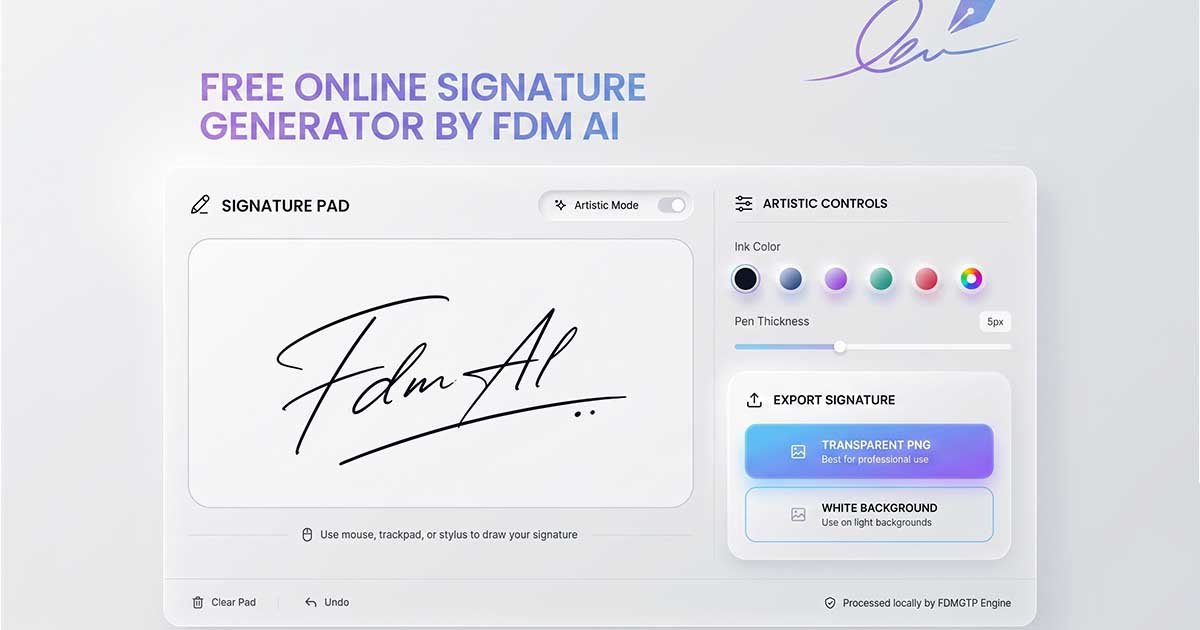
We have developed a smooth drawing pad that mimics the friction of real ink on paper. It works perfectly with a mouse, trackpad, or stylus. If you are using a tablet or touchscreen laptop, you will find the experience even more fluid and natural.
3. Full Customization Options
A signature should reflect your personality. You can:
Change ink color: Choose between classic black, professional blue, or any custom hex color.
Adjust pen thickness: Fine-tune the stroke weight to match the style of your document.
Undo/Clear: Mistakes are no problem; you can refine your stroke with a single click.
4. Zero Friction & No Watermarks
We don't believe in holding your work hostage. There is no registration, no email requirement, and absolutely no watermarks on your final Transparent PNG Signature.
How to Create Your Transparent PNG E-Signature in 4 Simple Steps
Creating a high-quality digital signature has never been easier. Follow these steps:
Open the Signature Pad: Navigate to our Signature Generator tool.
Draw Your Signature: Use your mouse or stylus to sign naturally inside the box.
Customize Your Style: Select your preferred ink color and adjust the pen thickness. For a more authoritative look, a slightly thicker stroke is often better.
Download as Transparent PNG: Simply click “Export” and your high-quality E-Signature will download instantly to your device.
Transparent PNG vs Other Formats
Format | Transparency | Quality | Best For | Drawback |
Transparent PNG | Yes | Excellent | Documents, PDFs, Invoices | Slight file size increase |
JPEG | No | Good | Quick sharing | White background box |
SVG | Yes | Scalable | Large Scale Printing | Can lose handwritten feel |
As seen above, the Transparent PNG E-Signature is the gold standard for digital documentation because it balances quality with professional-grade transparency.
Best Ways to Use Your Digital Signature
Once you have downloaded your PNG E-Signature, the possibilities are endless:
Business Contracts: Insert directly into PDFs using Adobe Acrobat, SmallPDF, or Google Drive.
Freelance Invoices: Add authenticity to your invoices on platforms like Upwork or Fiverr.
Microsoft Word & Google Docs: Simply go to Insert > Image and place your signature over the signature lines.
Email Signatures: Upload the PNG to your Gmail or Outlook signature settings for a personal, handwritten sign-off on every email.
Common Mistakes to Avoid
To maintain a professional image, avoid these common pitfalls:
Low-Resolution Files: Always use a high-quality export to avoid pixelation when printing.
White Backgrounds: Never use a JPEG with a white box on a non-white document; always opt for a E-Signature.
Unsafe Tools: Be wary of sites that require you to upload your signature to their "cloud." Your signature is a key part of your identity—keep it local.
Is an Electronic Signature Legally Valid?
In 2026, the legal landscape for digital signatures is very robust. In most countries, including the USA (ESIGN Act), EU (eIDAS), and UK, electronic signatures are legally recognized for most business transactions. A handwritten-style Transparent PNG E-Signature created with our tool is widely accepted for contracts, NDAs, and approval forms.
Note: For high-level government deeds or specific legal court documents, always verify local requirements.
Why Privacy Matters in 2026
With the rise of AI and digital forgery, protecting your biological signature is more important than ever. By using our client-side Transparent PNG E-Signature generator, you eliminate the risk of a database leak exposing your signature. Since the data stays on your Windows 10, Mac, or mobile device, you remain in full control.
Conclusion
A professional E-Signature is no longer a luxury — it’s an essential productivity tool. Stop wasting time with printers and scanners. Create a clean, natural, and fully transparent digital signature in seconds and streamline your entire document workflow.
Ready to get your signature?
Create your professional PNG E-Signature now — it’s fast, free, and 100% private.