Finding a reliable free media converter is the first step toward a professional content workflow. In 2026, recording content has never been easier, yet many creators hit a wall after the "Record" button is turned off. Whether you are capturing cinematic B-roll or recording a podcast, you inevitably face "Unsupported File" errors. Instead of wasting time on bloated software, modern creators rely on a browser-native free media converter to handle everything in one place.
This guide walks you through a clean, efficient workflow to convert raw footage into platform-ready content—fast, secure, and optimized for growth.
⚡ The Real Problem: Format Confusion Across Platforms
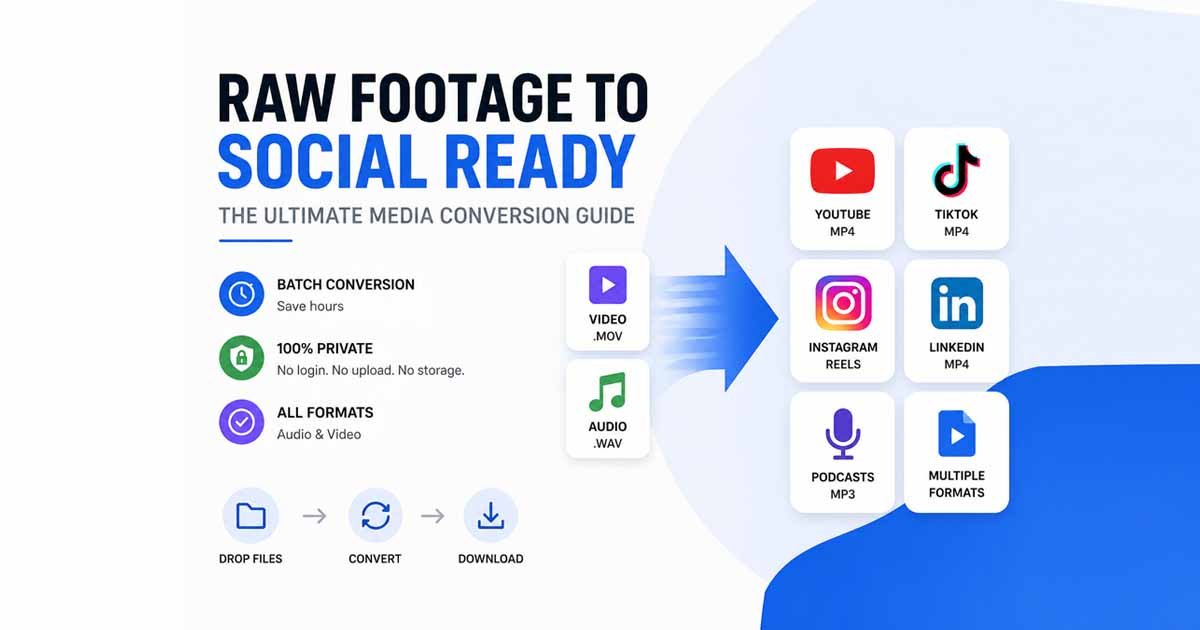
Every social platform has unique requirements. Uploading the wrong format leads to heavy compression, rejected uploads, or blurry video quality. By using a free media converter, you can ensure your technical specs match these 2026 standards:
Platform | Best Video Format | Aspect Ratio | Key Requirement |
YouTube | MP4 (H.264) | 16:9 | High resolution |
TikTok | MP4 / MOV | 9:16 | Vertical orientation |
Instagram Reels | MP4 | 9:16 | Fast loading |
MP4 | 16:9 / 1:1 | Professional clarity | |
Podcasts | MP3 | — | Small file size |
The key isn’t just changing a file extension; it’s about using a video converter online to ensure your content looks professional on every screen.
🔄 Step 1: Batch Processing—The Secret to Efficiency
If you are converting one file at a time, you are losing hours of creative potential. A free media converter with batch capabilities is a game-changer. Imagine you have ten clips from a shoot; a batch media converter online allows you to drop all files into one session. This maintains consistency and ensures your audio converter online tasks and video exports finish simultaneously.
🎥 Step 2: High-Performance Video Optimization
YouTube & Long-Form Content
YouTube prefers high-bitrate MP4 files. If your camera records in professional MOV, you need a free media converter to perform a mov to mp4 transition. This ensures your 4K footage remains crisp while the file size becomes manageable for fast uploads.
TikTok & Instagram Reels
Mobile-first platforms require vertical video. Sometimes, high-resolution files from a DSLR are too "heavy" for mobile apps to process, causing lag. Using a free media converter to optimize these files before uploading ensures the smoothest possible playback for your viewers.
🎙️ Step 3: Transforming Audio for Global Streaming
Audio is 50% of the viewer experience, but raw files (WAV) are far too large for streaming.
For Editing: Keep files in WAV.
For Publishing: Use a wav to mp3 workflow via an audio converter online.
This reduces the file size by up to 90% without audible quality loss, making your podcast accessible to listeners on slow mobile connections.
🔐 Step 4: The Privacy-First Advantage (No-Login)
Data privacy is no longer optional. Most "free" tools require an account, but a true no login file converter keeps your content safe. When you use the Free Document Maker Media Converter, your files are processed locally in your browser. This means:
No Account Required: Avoid spam and data mining.
No Server Uploads: Your unreleased footage never leaves your device.
Instant Access: No waiting for email verification or "pro" queues.
⚡ Step 5: Speed vs. Friction (Why Every Second Counts)
In the creator economy, speed is a competitive advantage. The old way of "Upload → Wait → Convert → Download" is dead. A modern free media converter uses your browser’s engine to convert files instantly. Removing this friction means you can post a trending clip in minutes, while your competitors are still waiting for their software to load.
🧠 Pro Tips for Scaling Your Content
Always Backup: Keep your raw files on an external drive; only convert copies.
Format Standards: Use MP4 for video and MP3 for audio; these are the world's most compatible formats.
Batch Workflow: Use a free media converter to process all your b-roll at once to save time during the final edit.
Privacy First: Only use a no login file converter for sensitive or client-based projects to ensure zero data leakage.
📈 Why This Workflow Improves Growth
Growth comes from consistency. When you use a free media converter to simplify the technical side of creation, you have more energy for the creative side. Removing the technical hurdles of file formats and slow software allows you to post more frequently, which is exactly what social media algorithms reward in 2026.
✅ Final Takeaway
Scaling your content doesn't require expensive software. It requires a fast, secure, and efficient process. By utilizing a free media converter, you can bridge the gap between "raw footage" and "social ready" in seconds.
Start your frictionless workflow today:
All-in-One Suite: Free Media Converter
Audio Specialty: Audio Converter Online
Video Specialty: Video Converter Online
Record → Convert → Publish. It’s that simple.
Free Document Maker (FDM AI) is an AI-powered browser-based platform designed to help users create, edit, and convert digital files instantly. The platform offers more than 30+ productivity tools for documents, PDFs, images, spreadsheets, media files, and compressed archives. Everything runs securely in your browser with no login required, no watermark, and instant processing. Free Document Maker is available as a web application, Chrome extension, and an Android app on Google Play, making it easy to access powerful document tools across desktop and mobile devices.