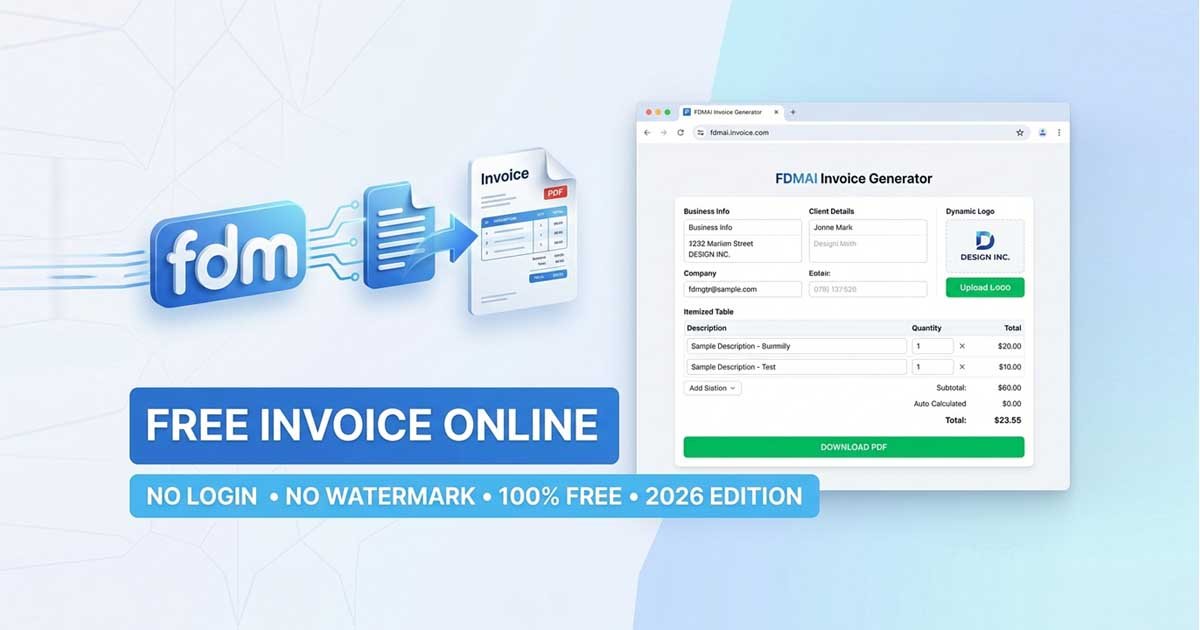
In the modern digital economy, getting paid shouldn't be a chore. Whether you are a freelance developer in Dhaka, a graphic designer in New York, or a small business owner, the ability to create a free invoice online is critical for maintaining cash flow and professional credibility.
However, many "free" tools in 2026 come with hidden catches: mandatory sign-ups, data harvesting, or ugly watermarks that unprofessionalize your brand. This guide will show you how to bypass those hurdles using the Free Document Maker (FDM AI) ecosystem to generate high-quality, professional invoices in under two minutes.
Try the Tool Now: Free Invoice Generator
Why You Should Create a Free Invoice Online vs. Using Manual Templates
For years, professionals relied on Word or Excel templates. While functional, they are prone to human error—specifically in calculation and formatting.
The Risks of Manual Invoicing:
Calculation Errors: Forgetting to add tax or miscalculating a discount can lead to awkward conversations with clients.
Formatting Issues: Sending a
.docxfile can look different on a client’s screen. A browser-native PDF generator ensures your layout is locked.Time Consumption: Manually entering business details every time is inefficient.
By choosing to create a free invoice online, you leverage automation. Modern AI-driven generators handle the math, ensure responsive design, and offer one-click PDF exports.
Step 1: Select a Privacy-First Invoice Generator
Not all online generators are equal. In 2026, data privacy is a top concern. You should choose a tool that offers no-login functionality. This ensures your financial data isn't sitting on a third-party server indefinitely.
Recommended Platform: Free Document Maker (FDM AI)
Key Features to Look For:
Auto-Calculations: The tool should automatically handle Subtotals, VAT/GST, and Discounts.
No-Watermark Exports: Your invoice should represent your brand, not the software provider's.
Mobile-Friendly: The ability to generate an invoice from your phone immediately after a client meeting.
Step 2: Input Your Business Identity
The header of your invoice is your "digital storefront." It must be clear and authoritative.
Essential Details to Include:
Legal Business Name: Or your full name if you are a sole proprietor.
Contact Information: A professional email and a phone number are non-negotiable.
Professional Logo: FDM AI allows you to upload a PNG or JPG logo. This small detail increases the likelihood of being paid on time by 30%, as it reinforces brand recognition.
Step 3: Client Details & Invoice Numbering
Accuracy in client information prevents "lost" invoices.
Bill To: Include the specific department or person responsible for payments.
Invoice Number: Use a consistent numbering system (e.g., INV-2026-001). This is vital for your tax records and helps the client track the payment in their accounting software.
Date of Issue & Due Date: Clearly stating "Net 30" or "Due on Receipt" sets the expectation immediately.
Step 4: Itemizing Services with AI Precision
This is the core of the document. When you create a free invoice online, use clear descriptions to avoid "scope creep" questions from clients.
Example Itemization Table:
Description | Quantity/Hours | Unit Price | Total |
UI/UX Design - Homepage | 1 | $400.00 | $400.00 |
Full-Stack Development | 20 hrs | $60.00/hr | $1,200.00 |
SEO Optimization | 1 month | $300.00 | $300.00 |
Subtotal | $1,900.00 |
Note: AI-powered tools like FDM AI will automatically calculate these rows as you type.
Step 5: Configuring Taxes and Payment Terms
Global business requires flexible tax settings. Whether you are dealing with VAT, GST, or Sales Tax, ensure the percentage is applied correctly to the subtotal.
Pro-Tip: Incentivize Early Payments
Include a "Payment Terms" section at the bottom. Adding a simple note like "5% discount if paid within 7 days" can significantly speed up your collection process.
Step 6: Preview, Download, and Send
Before finalizing, use the "Live Preview" feature. Check for:
Typoz: Especially in the total amounts.
Payment Links: Ensure your bank details or PayPal/Stripe links are correct.
PDF Quality: Ensure the font is readable and professional.
With Free Document Maker, you can download the PDF instantly or use the session-based "Send" feature to email it directly to the client's inbox.
The FDM AI Advantage: Beyond Invoicing
Invoicing is just one part of a professional workflow. To truly streamline your business, you should use a suite of tools that follow the same "No Login" philosophy.
Tool | Benefit |
All-in-one workspace for document automation. | |
Secure your privacy when testing client sign-up flows. | |
Reward students or employees instantly. | |
Create ATS-friendly resumes using AI. |
Final Thoughts
In 2026, the best business tools are the ones that stay out of your way. When you create a free invoice online with Free Document Maker, you aren't just saving money—you are reclaiming time and protecting your data privacy.
Ready to get paid? Generate your professional invoice now.
Frequently Asked Questions (FAQ)
Is it really free to create an invoice online?
Yes. While many sites claim to be free and then charge for PDF downloads, FDM AI provides 100% free exports with no hidden fees.
Do I need an account to save my invoices?
No. FDM AI uses browser-native technology to allow you to edit and download without ever creating an account.
How do I make my invoice look professional?
Always include a high-resolution logo, use a clean font, and ensure your item descriptions are specific.
Is my data safe on an online generator?
By using a "No-Login" tool like Free Document Maker, your sensitive financial data isn't stored in a permanent database, offering superior privacy compared to traditional SaaS platforms.